Restaurant POS
Cloud restaurant POS for Nigeria: tables, kitchen display, recipe costing, waste tracking, online ordering, kiosks, deliveries and discount codes.
One system for your floor, kitchen, stockroom & books
Every part talks to the others: an order reaches the kitchen, a dish sold takes its ingredients out of stock, waste and food cost show up on your dashboards, and it all lands in your books.
Restaurant Point of Sale
Take orders at the table, the counter or for takeaway, on any device. Lay out your floors and tables, see guests per table and the bill so far, and take cash, card, transfer, POS terminal or wallet payments. The till keeps selling when the internet drops and sends the sales up when it's back.
Kitchen Display & Stations
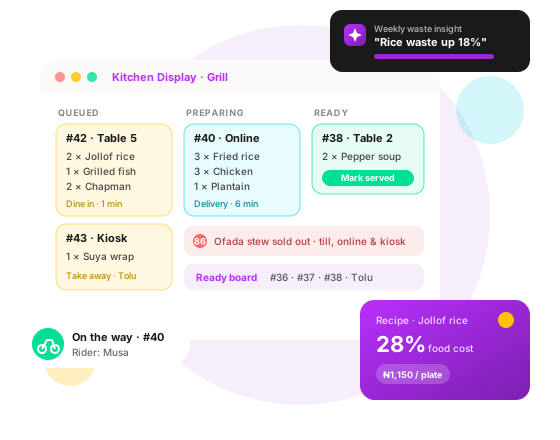
Press Order and the dishes go straight to the right station's screen, by category or product, for prep and expo. Cooks move each order from queued to preparing to ready, the till sees where every order is, and the kitchen and the till can message each other. Every order gets a number for the day, the same on the receipt, the screens and the customer's order page.
Sold Out Means Sold Out
Mark a dish sold out once and it disappears from the till, the online menu and the kiosks, so nobody sells what the kitchen can't make. A public ready board on a screen at the branch shows customers which orders are ready, by number or name.
Recipe Management & Food Cost
On Growth plans and up: write each dish's recipe with net quantities and yield, and prep recipes for sauces and bases. Fosbiz works out cost per portion, food cost % and margin, and the price for the food cost you aim for. Ingredients leave your stock when the dish sells, options can change the ingredients, and you're alerted when costs climb. Print recipe cards for the kitchen.
Allergens & Diets
Tag each dish's allergens and diets once, and customers see them on the online menu and at the kiosk before they order.
Waste Intelligence
On Growth plans and up: log waste as it happens and it comes off your stock, a dish taking its recipe's ingredients with it. When an item is voided at the till, staff are asked whether it was already made. Record end-of-day overproduction, and see what you throw away, why, and what it costs, on Waste Analysis and the dashboards. On Advanced and Enterprise, a weekly summary written by AI points out where waste is growing.
Batches & Production Sheet
Plan the day's prep: make batches of your prep recipes and follow them on a production sheet. The Kitchen dashboard shows how long tickets take and which stations run late.
Online Ordering & Table QR Codes
On Growth plans and up: customers order from your menu on your own ordering page, or scan a table's QR code to order from their seat, and pay online or at the branch. Orders go to the kitchen, staff follow them on one Online Orders board, prices are always worked out by Fosbiz, and refunds go back to the customer's wallet.
Self-Ordering Kiosk
On Growth plans and up: put your menu full screen on a screen at the branch. Walk-ins order eat in or take away, give a name to be called by, and pay as you allow. Each kiosk has its own link and an exit PIN, and its orders go straight to the kitchen.
Deliveries
On Growth plans and up: send food out with your own riders or a delivery company. Pick delivery and the driver at payment, or hand an online order to a driver from the orders board. The driver is told when the food is ready, moves the delivery along from the mobile app, and the customer sees who is bringing it. Food that comes back is logged as waste.
Discounting & Promo Campaigns
Create discount codes per branch, as a percentage or a fixed amount, with start and end dates for seasonal offers and limits on how often they can be used. Give a code to everyone, to chosen customers or to a loyalty tier, and the till adds it at payment while online customers can type it in. Each code shows how many times it was used. On Advanced and Enterprise, a CRM automation picks the customers (on their birthday, after they stop coming, once they spend a set amount), adds them to a code and emails it to them.
CRM & Email Marketing
On Advanced and Enterprise plans: customer profiles, segments and loyalty tiers, a sales pipeline, and email automations you build by dragging. A trigger starts each one (first order, a paid order, wallet top-up or low balance, an online order's progress, a birthday, a lapsed customer, spend reached), then wait, check a condition, send an email, add a tag, create a lead or add the customer to a discount code. Emails are designed by AI, tracked as delivered, opened and clicked, carry an unsubscribe link, and offers go only to customers who agreed to receive them.
AI Customer Chat, Day and Night
On Advanced and Enterprise plans: an AI assistant on your ordering page, and on your own website, answers customers at any hour about your menu, prices and their orders. When a person is needed, it hands the chat to your branch staff, who reply from Fosbiz. Each reply uses AI credits.
Inventory & Analytics
Track ingredients and stock across branches with a daily low-stock email, and see sales, busy hours, best sellers, payment methods, cashiers and open registers on POS Analytics, with food cost % and waste % of food sales.
Customer Wallets
Regulars pay ahead with a prepaid wallet they top up online and spend at any branch. Refunds can go straight back to the wallet, and every naira in wallets shows up properly in your accounts.
An AI Assistant That Knows Your Floor
Ask in plain English: "Which tables are free?", "How many covers did we serve this week?", "Dine-in or takeaway, which sold more?" The Fosbiz AI Assistant answers from your live sales, tables and stock, on the web or the mobile app, and only shows each staff member what their role allows. See all AI features.
Online Payments & Google Sign-In
Get paid by card or transfer with Paystack, Flutterwave or Moniepoint, for online orders and wallet top-ups, and see every payment in your books. Customers can sign in with Google.
Audit Trails
Know who did what. An audit log of changes to prices, payments, rights and settings comes with every plan.
Staff, Payroll & Accounting Included
Manage staff records, shifts, clock-in/clock-out, leave and payroll, and see your real profit with invoicing and financial reports, in the same system as your tills and kitchen.
Bring Your Data From Your Old POS
Fill in our spreadsheet templates with your products, categories, customers, stock on hand, wallet balances, unpaid invoices and opening balances. We check every row, do a test run, then import, and you can import again to update instead of duplicating.
Your Restaurant on Your Phone
The Fosbiz mobile app (Android; iOS coming) comes with every plan: sales overview, tables, the online orders board, low stock and deliveries for your drivers, plus team chat with notifications and the AI Assistant. Staff also clock in, request time off and see payslips, and managers approve on the go.
Restaurant POS questions
What is Fosbiz Restaurant POS?
Fosbiz Restaurant POS is cloud point-of-sale and kitchen software for Nigerian restaurants, cafés, bars and kitchens, made by Foslah Technologies in Lagos. It takes orders at tables, at the counter, online and at a kiosk, sends them to a kitchen display, costs your recipes and tracks waste, and includes inventory, HR, payroll, accounting and team chat in the same system.
How much does Fosbiz Restaurant POS cost?
Restaurant POS plans cost ₦116,100, ₦145,100 or ₦174,100 a month, billed annually, and Enterprise is priced to fit your business. Every plan includes tables, the kitchen display and discount codes; Growth adds recipes, waste tracking, online ordering, kiosks and deliveries; Advanced adds weekly AI waste insights, CRM and email marketing and the AI customer chat.
How does the kitchen display work?
When the cashier or waiter presses Order, the dishes go to the right kitchen station on a screen, by category or product. Cooks mark each order preparing and ready, the till sees its status, and a ready board can show customers their order number or name. A dish marked sold out disappears from the till, the online menu and the kiosks.
Can customers order online or at a kiosk?
Yes, from the Growth plan. Customers order from your menu on your own ordering page, or by scanning a table's QR code, and pay online or at the branch. A kiosk puts the menu on a screen at the branch so walk-ins order and pay themselves, eat in or take away. Every order goes to the kitchen and shows on one Online Orders board.
How does recipe costing work?
You list each dish's ingredients with quantities and yield, and Fosbiz works out the cost per portion, food cost % and margin, and the price for the food cost you aim for. When a dish sells, its ingredients leave your stock, and you get an alert when ingredient prices push a dish's cost up.
Can I manage deliveries?
Yes, from the Growth plan. Use your own riders or a delivery company. Pick delivery and the driver at payment, or hand an online order to a driver from the orders board. The driver is told when the food is ready, moves the delivery along from the mobile app, and the customer sees who is bringing their order.
Can I move my data from my current POS?
Yes. You fill in Fosbiz spreadsheet templates with your products, categories, customers, stock on hand, wallet balances, unpaid invoices and opening balances. Fosbiz checks every row and does a test run before importing, and running the import again updates records instead of duplicating them.